
Settings - Domain Spam Filtering
An administrator can set domain-wide
Domain Spam filterFiltering and Security Settings
The Admin Panel allows you to establish default filtering and security preferences throughfor thean Adminentire Controldomain. Panel.These The setting wouldsettings apply to all users thatunless don'tthey have a configured their own personal preference set.preferences. A user's preferenceindividual settings will always overridesoverride athese domain-wide preference.defaults.
The domain-widespam report is designed to list emails currently held in your spam folder. Depending on your selection for the Spam filterReport preferencesContent cansetting, bethe foundreport will either summarize the latest messages received within your chosen delivery frequency or display every message currently residing in the spam folder at thisthe location:time the report is generated.
Accessing Filter Settings
- Go to .
- Log in using
adminyour Admin username and password. -
Click
onFiltering -> Settingstopnavigation menu. -
Use the Select Domain drop-down menu
barto SelectchoosetheDomainforthewhichdomain you wish tomodifymodify.the settings in the drop-down list

The
Filtering options are:Preferences
Accept e-mails from: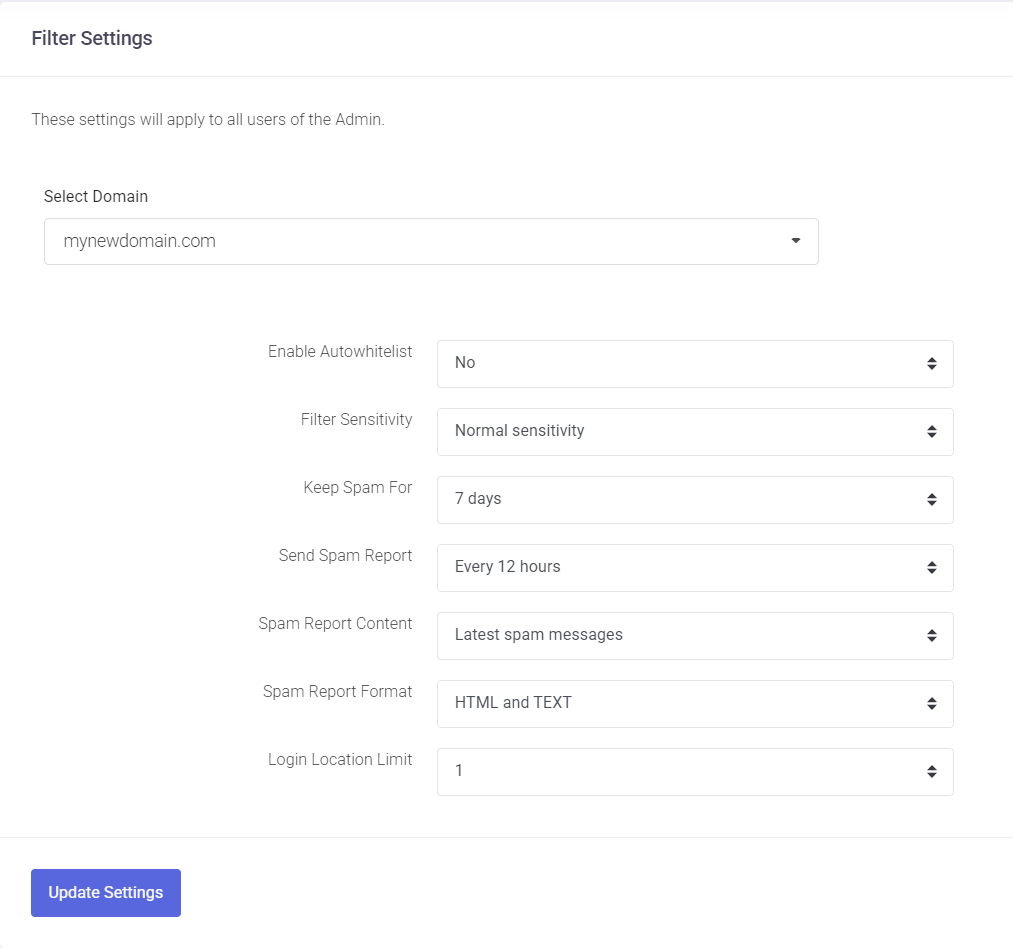
Everyone:This is the default option and lets all messages reach the Inbox (the default)Whitelist & Address book only:This option only allows messages present in the Whitelist & Address book to reach the Inbox, the rest will be sent to your spam folder.
Enable autowhitelistAutowhitelist: AllWhen e-mailsenabled, sentthe system automatically adds the email addresses of any external recipients contacted by e-mail accounts of your domain automatically add the recipient's addressusers to the domain'sdomain-wide auto-whitelist. AnWhile interestingthis option,reduces butthe possiblychance dangerousof legitimate replies being marked as spam, use it with caution: if a user account is compromised, sends spamscompromised and automaticallyused allfor spamming, those recipients ofwill such spams arebe added to theyour domain level auto-whitelist (accessible in Filtering > Auto-Whitelist), which would require cleaning up the auto-whitelist.
automatically.
Filter sensitivity:Sensitivity The filteringThis setting determines how aggressively the system canscans befor adjustedspam on a scale fromof 1 to 10,10.
-
being1: Most permissive setting; more spam may reach the
mostinbox. -
10: Most restrictive
whilesetting;1a higher volume of messages will be filtered. -
Normal Sensitivity: This is
the most permissive. We find thatthe default settingof Normal Sensitivityand isjust rightrecommended for mostusers.organizations.
Keep Spam for:For How manyChoose dayshow to keep the Spamlong messages remain in the Spam folder.folder Defaultbefore being permanently deleted. You can set this duration between 1 and 30 days. The default retention period is 7 days.
Send Spam Report:Report This definesSpecify how often the users willreceive receivea summary of trapped spam messages in their Inboxinbox.
-
Frequency: Choose a range from every 1 hour to every 24 hours.
-
Don't Send: Select this to disable the automated reports.
Spam Report Content Determine which messages are included in the summary ofreport:
-
Latest spam messages: Includes only the messages
trappedreceivedoversince thepastlastfewreporthours.wasDefaultgenerated.is -
12All
hours.spam messages: Lists all current messages residing in the user's spam folder.
Spam E-mail Report Format: Lets you chooseSelect the delivery format offor the Spamreport. ReportThe message. Defaultdefault is HTML and TEXT.TEXT to ensure compatibility across all email clients.
After making
Saving changes,Your Changes Once you have adjusted the settings to your preference, click onthe the Update Settings button.button at the bottom of the page to apply the changes to the domain.
Security Settings
Login Location Limit This setting helps identify and prevent unauthorized account access by monitoring geographic login patterns. For example, if an employee only works from a specific country, you can limit their account to 1 login location.
Our custom detection system reviews login attempts from new or unusual locations. Depending on the level of risk detected, the system may allow the login or block the account to protect sensitive data.