# CalDAV / CardDAV allow delete via Synchronization
The CalDAV / CardDAV features are available only for Enhanced mailboxes.
Due to a bug in Android 12 some phones started to delete contacts via Microsoft ActiveSync. Therefore, GroupOffice has implemented a new CalDAV / CardDAV setting that disallows deletes via sync by default now. More info on the bug can be found here: [https://eu.community.samsung.com/t5/galaxy-z-fold-z-flip/outlook-contacts-gone-after-android-12-update/td-p/4567744/page/2](https://eu.community.samsung.com/t5/galaxy-z-fold-z-flip/outlook-contacts-gone-after-android-12-update/td-p/4567744/page/2).
Because this option is disabled by default, you might now receive this error in your CalDAV / CardDAV client:
**Deleting is disabled by user sync settings**
### To enable delete via synchronization:
- Go to the **[Webmail](https://wiki.emailarray.com/display/Support/Webmail+client)**
- Log in using your full **e-mail address** and your **current e-mail password**
- Click on the **User** icon from the top right to activate the menu. Then click on **My account**
[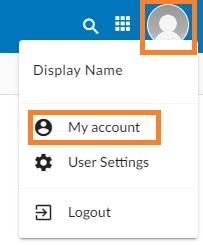](https://wikidev.emailarray.com/uploads/images/gallery/2024-08/etxwebmail-how-to-access-advanced-settings-for-your-email-account.jpg)
- In the **Synchronization** tab, find the **Allow delete via synchronization** section.
[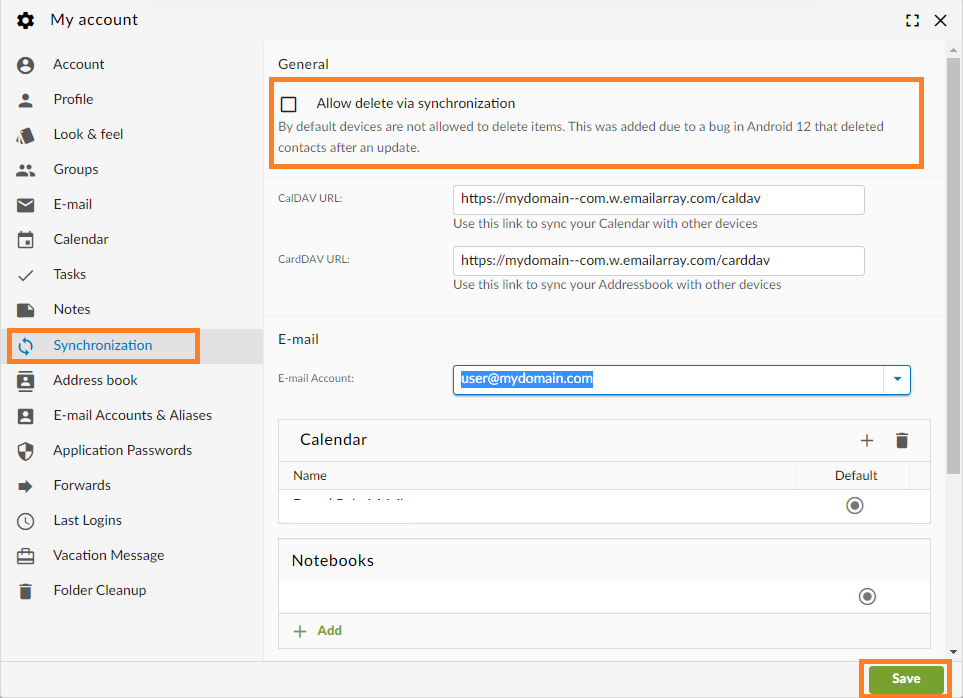](https://wikidev.emailarray.com/uploads/images/gallery/2024-08/webmail-user-settings-synchronization-caldav-carddav-allow-delete.png)
- Enable the feature using the checkmark
- Click on the **Save** button.