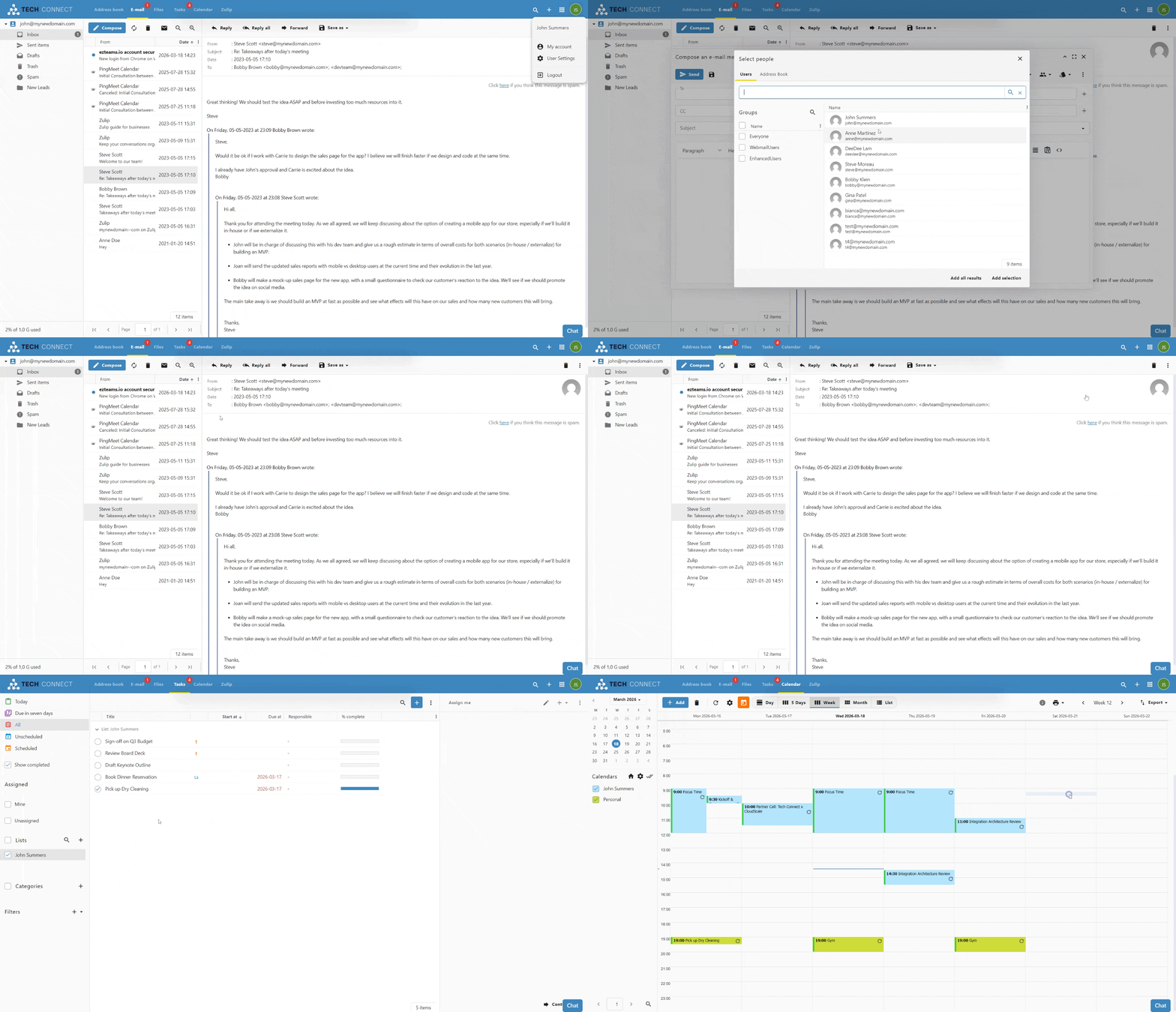
Webmail - How To

Features available in our Webmail GroupOffice - available for Basic and Enhanced mailboxes.

To access your webmail you have a few options:

Webmail - How to access it

Webmail - Demo

Webmail Demo - example for branding.gif

Webmail - Customization

Personalizing Your Webmail Experience

We believe your inbox should work exactly the way you do. While your administrator can set global defaults (like timezone and date formats) from the Admin Panel -> Settings -> Localization, you have full control over your personal "Look & Feel" directly within the Webmail interface.

Webmail - Customization.png Webmail - Customization - 2.png

Accessing Your Webmail Settings

To begin customizing your experience:

  1. Log in to your Webmail account

  2. Click the User Icon (Settings) in the top right navigation bar.

  3. Select "My account" from the menu.

  4. Navigate to the "Look & feel" tab in the left-hand sidebar.


Visual Themes and Layout

Personalize the interface to match your workspace environment.

1. Theme Selection

Choose a visual style that is easiest on your eyes:

2. Global Display Options

Fine-tune how you interact with your mail and lists:


Regional and Localization Settings

While these may be pre-configured by your administrator, you can override them to suit your specific location or preference.

Pro Tip: If you've moved things around and want to return to the original layout, use the "Reset windows and grids" button at the bottom of the page.


Notifications and Sounds

Manage how your Webmail alerts you to new activity.


Formatting and Separators

For users dealing with international data or specific spreadsheet needs, you can customize how numbers and lists are displayed:


Other Webmail Personalization


Customizing Your Message List

webmail - message list - visible columns and group by.png

Visible Columns

The message list can be tailored to show only the information that matters most to you. You can add or remove columns to change how much detail is visible at a glance.

Managing How Emails are Grouped

By default, your messages are organized into chronological groups to help you navigate your inbox quickly. You can change this behavior or disable grouping entirely to see a continuous list of emails.

To change your grouping preferences:

Webmail - Folders management

Find out how to subscribe to a Folder to make it show in your e-mail folder list, how to unsubscribe from a Folder and hide it or how to create a new folder.

Step-by-step guide

Subscribe to a Folder

Subscribing to a folder will make it show in your e-mail folder list (usually on the left side of your Webmail or e-mail client). Some e-mail clients will show by default all folders, even the unsubscribed ones.

To subscribe to a folder, log in to your Webmail and

Webmail - Email tab - Folders advanced menu.jpg


Webmail - Email tab - subscribe to folder.jpg

Unsubscribe from a Folder

Unsubscribing from a folder will hide it from your e-mail folder list (usually on the left side of your Webmail or e-mail client). Some e-mail clients will show by default all folders, even the unsubscribed ones.

To unsubscribe to a folder, log in to your Webmail and

      Webmail - Email tab - Folders advanced menu (3).jpg

Add a Folder

The easiest way to add a new folder to your mailbox is from the E-mail tab. 

Log in to your Webmail and

     Webmail - Email tab - add folder.jpg

Another option to add a new folder is from the Folders advanced menu. To access it, log in to your Webmail and

     webmail - Email tab - email account settings.png

     Webmail - Email tab - email account properties - Folders - add folder.jpg

Webmail - Email tab - email account properties - Folders - enter the folder name.jpg

Webmail - Send as Alias

When you have one or more Aliases for your email address, you might want to be able to send from one of the Aliases. This is possible by adding the Alias to your Webmail.

Step-by-step guide

You must create the Alias before adding it to the Webmail.

After you log in to your Webmail,

webmail - Email tab - email account settings.png

webmail - Email tab - email account properties.jpg

webmail - Email tab - add alias account.png

Webmail - Signature: create, load and set one as default

When you want to end your emails with a custom greeting or add your company info and logo, you can add a default signature in your GroupOffice webmail.

Step-by-step guide

After you log in to your Webmail:

Create a signature

webmail GroupOffice - go to My Account settings.jpg

webmail GroupOffice - Email - add a new Template for email signatures.jpg

webmail GroupOffice - Email - create the Template for email signatures.jpg

Load a signature or set one as default

webmail GroupOffice - Email - load the Template as email signature and make it default.jpg

CalDAV / CardDAV allow delete via Synchronization

The CalDAV / CardDAV features are available only for Enhanced mailboxes.

Due to a bug in Android 12 some phones started to delete contacts via Microsoft ActiveSync. Therefore, GroupOffice has implemented a new CalDAV / CardDAV setting that disallows deletes via sync by default now. More info on the bug can be found here: https://eu.community.samsung.com/t5/galaxy-z-fold-z-flip/outlook-contacts-gone-after-android-12-update/td-p/4567744/page/2.

Because this option is disabled by default, you might now receive this error in your CalDAV / CardDAV client:

Deleting is disabled by user sync settings

To enable delete via synchronization:

Webmail - how to access advanced settings for your email account.jpg

Webmail User Settings - Synchronization - CalDAV CardDAV allow delete.png

Webmail - mark email as Spam or block a sender

Sometimes you might receive unsolicited emails that you wish to mark as Spam. You can do so straight from the Webmail interface. Our system will be trained to mark future emails from this sender as Spam, and all such emails will be delivered to your Spam folder.

If you wish to block a sender completely, you can further use the option to Blacklist it, and all incoming emails from that sender will be rejected.

Mark email as Spam

After you log in to your Webmail:

     Webmail - move to Spam.jpg


Block a sender

After you log in to your Webmail:

     Webmail - blacklist a sender.jpg

Webmail - mark email as legit (Not Spam)

If our system has marked an incoming email as Spam, but you are sure it is a legit email, you can whitelist the sender straight from the Webmail.

Mark email as legit (Not Spam)

After you log in to your Webmail:

     Webmail - not Spam - mark email as legit.jpg

If you have whitelisted a sender, but incoming emails are still delivered to your Spam folder, make sure there is no Blacklist entry for this sender or domain.

Chat and Video Meetings

This guide will help you get started with our new integrated Chat and Video Meetings feature within Webmail.

Chat and Video Meetings

Getting Started: Accessing Chat & Meetings

This guide will help you get started with our new integrated Chat and Video Meetings feature within Webmail.

Good news! The Chat and Video Meetings feature is activated by default every time you log into your Webmail account. You'll find the chat panel conveniently located within the Webmail interface.

Building Your Contact List - How to Add a Contact

Upon your first login, your contacts list will be empty. You'll need to manually add people you wish to chat or meet with.

1. Locate the CONTACTS section in the chat panel.

2. Click on the three horizontal lines (hamburger menu) next to CONTACTS.

3. Select "Add a contact" from the dropdown menu.

 Chat - click on add a contact.PNG

4. A new pop-up window will appear.

Chat - add a contact pop-up window.PNGChat - add users from other domains.PNG

5. The contact will now appear in your list. 

The other user must accept the invitation before you can chat with each other.

Important Note: If a user's name (from within our organization) appears in red during your search, it means they have not yet logged into their Webmail account, and their Chat account hasn't been enabled. You won't be able to add them as a contact until they log in for the first time. This does not apply to external domain users you are adding manually.
Chat - search for a new contact.PNG


Starting a Chat

Once you have contacts in your list:

  1. Click on a contact's name in your CONTACTS list.
  2. A chat window will open, and you can start typing your message.

Starting a Video Meeting

You can easily initiate a video meeting with anyone in your Contacts list or even invite external participants.

How to Start a Video Meeting:

  1. Click on a contact's name in your CONTACTS list. A chat window will open.
  2. Click on the camera button. A new pop-up window will appear.
    • Optional Room Name: You can give your meeting room a specific name if desired.
    • Click the Start Meeting button
  3. Starting a meeting will create a secure video room and the link to this meeting room will be shared with your contact.
Chat and Video Meetings

Video Meetings Features

Our video meetings are packed with useful features to enhance your collaboration:

Chat and Video Meetings

Using Chat and Meetings on Other Apps (XMPP)

You can also connect your Webmail chat and meeting account to other desktop or mobile applications that support the XMPP protocol (e.g., Thunderbird, eM Client).

Login Details for XMPP Apps:


Connecting Your Chat Account to eM Client (XMPP)

You can integrate your Webmail chat directly into the eM Client application. Follow these steps to set it up:

1. Open eM Client Account Settings:

eM Client - go to Accounts.PNG

2. Add a New Chat Account:

eM Client - go to add account and select new Chat Group Chat - new XMPP Jabber account.PNG

3. Specify New Jabber Account:

eM Client XMPP - use existing.PNG

4. Enter Your Account Credentials (Identity):

You will now be on the "Identity" screen. Fill in the following details:

eM Client XMPP - credentials and host.PNG


5. Finalize Setup:


Your Webmail chat account should now be configured in eM Client. You will be able to send and receive messages, see your contacts directly within the application and add new ones.


Connecting Your Chat Account to Mozilla Thunderbird (XMPP)

You can use your Webmail chat directly within Mozilla Thunderbird. Follow these steps to configure it:

1. Access the Chat Feature:

Thunderbird - step 1- click on Chat.PNG


2. Begin Chat Account Setup:

Thunderbird - step 2 - click on get started.PNG


3. Choose the Chat Network:

Thunderbird - step 3 - choose XMPP as the network.PNG


4. Enter Your Username Details:

Thunderbird - step 4 - username.PNG


5. Enter Your Password:

Thunderbird - step 5 - optional password or get prompted every time.PNG


6. Configure Advanced Options (XMPP Options):

Thunderbird - step 6 - server host name.PNG


7. Review Summary and Finish:

Thunderbird - step 7 - summary.PNG


Your Webmail chat account should now be configured in Thunderbird. You'll be able to manage your contacts, send and receive messages, and see your online status directly within the Thunderbird interface.


Files

Files

Webmail - Files and Folder Sharing Guide

Whether you need to send a single document or collaborate on an entire project, sharing is simple and flexible. You have two main options:

The Webmail allows you to share folders with other members of your organization, enabling seamless collaboration. With the latest updates, you have precise control over how you distribute your work, whether collaborating internally or sharing documents externally.

Document Editing and Collaboration

The ability to interact with documents depends on your active mailbox type.

  • Basic Mailboxes: Users can only upload and view documents.

  • Enhanced Mailboxes: Users can edit and collaborate on documents in real-time.

The live editing environment is powered by the OnlyOffice integration. Supported formats include Word documents, spreadsheets, presentations, and PDFs.

Sharing Folders

Folder sharing is restricted to internal use only, meaning you can only share folders with users within your domain.

How to Share a Folder

Follow these steps to activate sharing for a specific folder within your Webmail:

  1. Select the Folder: In the Webmail files section, right-click on the folder you wish to share and select Properties.

    Webmail - files - click on properties.PNG

  2. Activate Sharing: In the Properties tab, check the box labeled Activate sharing. This enables the sharing functionality for that specific directory.

    Webmail - files - click on activate sharing.PNG

  3. Configure Notifications (Optional): You may also choose to:

    • Notify me about changes in this folder: Receive alerts when others modify files.

    • Apply the folder's display settings for everyone: Standardize the view for all collaborators.

  4. Save Changes: Click Apply or Save.

Managing Permissions

Once sharing is active, you can define exactly who has access and what level of control they have.

  1. Navigate to the Permissions tab within the Properties window.

  2. Add Members: Click the plus (+) icon to add new users or groups to the folder. The default permission for new users is read-only.

    Group sharing: you also have the optional choice to share the folder with everyone in your group for faster onboarding

    Webmail-enable-share-for-folder-step-3-default-permission-is-readonly.png

  3. Change Access Levels: Double-click the permission level next to a user name to change it.

    Webmail-enable-share-for-folder-step-4-double-click-permission-name-to-change.png

    • Read only: Users can view and download files but cannot make changes.

    • Read and Create only: Users can view files and upload new content but cannot delete or modify existing files.

    • Write: view, upload or edit existing files.
    • Write and delete: view, upload, edit or delete existing files.
    • Manage: Full access to view, upload, edit, delete and share content.

  4. Remove Access: To stop sharing with a specific user, select their name and click the trash icon.

  5. Finalize: Click Save to apply the permissions.

Accessing Shared Content

When a folder is shared with you, it will appear under the Shared section in your file navigation sidebar. This allows teams to maintain a central repository for shared documents, images, and project files.

Webmail-view-folders-shared-with-me.png

Sharing Files

You can share individual files with internal or external collaborators by creating secure, time-limited download links.

Please use caution when sharing the URL, as anyone with the link can access the file.

Creating a Secure Download Link

  1. Locate your file: Navigate to the Files section in your Webmail.

  2. Open the sharing window: Right-click on the file you wish to share and click on Share Externally. This will open the sharing menu.

    Webmail-enable-share-for-file-right-click-share-externally.png

  3. Generate the link: Click Create Share button from the new window.

    Webmail-enable-share-for-file.png

  4. Configure Access: Set your desired permissions and choose an expiration date for the link.

    Download only: Users will download the file to their device.
    View in browser: Users can view the document online (read-only).
    View and edit collaboratively: Multiple users can view and edit simultaneously. Each user verifies their email and appears with their name.

    Webmail-enable-share-for-file-set-permissions-and-expiration-date.png

  5. Distribute the link: Once generated, you can copy this link and send it via email or chat.

    Webmail-check-status-for-share-for-file.png

  6. Manage Links: You can check the status of your active sharing links at any time

Viewing File Details and Active Links

You can review file information and manage active sharing links at any time, by:

Webmail-check-status-for-share-for-file-manage-external-access.png

Additional Sharing Options

When you right-click a file, you also have access to:

Bonus: Remote Editing Applications

You do not need to be logged into the web interface to stay productive. You can use the free OnlyOffice application to edit documents from any device, including laptops, tablets and phones.

Follow these simple steps to connect your account to the OnlyOffice app:

  1. Add a cloud of type "OnlyOffice".

    Onlyoffice - add a cloud.pngOnlyoffice - connect to an existing cloud-version-2.png

  2. Fill in your webmail URL (for example: https://mynewdomain--com.w.emailarray.com).

  3. You will be redirected to a login page. Use your email address and password to connect.

  4. The dashboard will display the files section from your webmail inside the OnlyOffice app, keeping everything in sync.

Webmail - Account Consolidation for Enhanced Mailboxes

Enhanced mailboxes offer the flexibility to manage multiple email accounts through a single Webmail interface. By consolidating your accounts, you can read and send messages from various internal or external addresses without needing to log in to separate profiles.

Before You Begin

This feature allows an Enhanced mailbox to add other accounts, whether they are Basic or Enhanced, into one view. Ensure you have the following details for the account you wish to add:


Step-by-Step Consolidation Guide

  1. Log in to your Webmail account
  2. Click the User Icon (Settings) in the top right navigation bar.

  3. Select My account from the menu.

  4. Navigate to the E-mail Accounts & Aliases tab in the left-hand sidebar.

  5. Click the Manage E-mail Accounts and Aliases button.

  6. Add New Account: In the Accounts window, click the plus (+) button in the top right corner.

    Webmail - add a new email account - click on plus button.PNG


  7. Configure the email account:

    • On the Properties tab, fill in the "Name" (how you want to appear to recipients) and the full "E-mail" address.

      Webmail - add a new email account - properties tab.PNG

    • Click the Server tab to enter the connection information:

      Webmail - add a new email account - server tab - internal mailboxes with SSL.PNG

      • Encryption: choose SSL for Incoming mail and Outgoing mail
      • Internal Accounts (Hosted with us)

        • imapin.emailarray.com for the IMAP Host

        • smtpin.emailarray.com for the SMTP Host

        • You may also use the standard imap.emailarray.com and smtp.emailarray.com.

      • External Accounts: Enter the specific IMAP and SMTP server names provided by your external email provider.

      • Credentials: Enter the username and password for the secondary account.

      • For Outgoing mail settings, please check Use IMAP credentials.
  8. Save Changes: Click Apply and then Ok to finalize the setup.


EasyMeet

Introducing EasyMeet - a professional appointment scheduling powered by Cal.com, built directly into your webmail. Just seamless online scheduling where you already work. Available for Enhanced mailboxes only.

EasyMeet

EasyMeet - Online Appointment Scheduling

EasyMeet is an integrated scheduling tool that eliminates the back and forth of finding the perfect meeting time. By sharing a public link, you allow clients and partners to view your availability and book appointments directly into your calendar.

You can set your working hours, create event types, share a public booking link, and view bookings from the Webmail.

Note: This feature is available exclusively for Enhanced accounts.

Before you start

Log in to the Webmail before following these steps. If you need help, see How to log in to the Webmail.

Getting Started

To begin using EasyMeet, log in to your Webmail and look for the EasyMeet tab in the top navigation bar. If you are using it for the first time, you will see an enablement screen. Click Enable EasyMeet to activate the feature for your mailbox.

EasyMeet - enable from the webmail if you have an Enhanced mailbox.PNG

Configuring Your Availability

Your availability determines when guests can book time with you. You can manage this under the Availability section in the left sidebar.

Setting Working Hours

  1. Select the Availability tab.

  2. Toggle the days of the week you are available.

  3. Define your time slots for each day (e.g., 9:30 AM to 5:00 PM).

  4. Select your correct Timezone from the dropdown menu to ensure appointments are synced accurately for both you and your guests.

  5. Click Save to apply your schedule.

    EasyMeet - 1 - availability schedule with date overrides.PNG

Date Overrides

If you have specific days where your schedule differs from your standard working hours (such as holidays or a one-off afternoon off), you can use Date overrides.

Managing Event Types

Event Types allow you to define different kinds of meetings, such as a 15-minute "Quick Chat" or a 60-minute "Consultation."

EasyMeet - 2 - Add event types - type of meetings your customers can schedule.PNG

  1. Navigate to Event Types in the sidebar.

  2. Click + New to create a meeting type.

  3. Provide a Title and a brief Description so your guests know what the meeting is about.

  4. Set the Duration (e.g., 15, 30, or 60 minutes).

  5. Choose a Location (e.g., Video Meeting).

  6. Customize the URL slug for this specific event.

  7. Click Continue or Save to publish the event type.

Once your event types are set up, you can share them with the world:

EasyMeet - 3 - get your public link.png

Managing Bookings

When a guest books a meeting, you will receive an email notification, and the event will automatically appear in your calendar.

EasyMeet - 3 - public link - event confirmed.PNG


EasyMeet

Event Advanced Setup

This guide details how to configure your Event Types to perfectly match your meeting requirements, from basic setup to advanced booking rules.


Creating a New Event Type

To start, navigate to the Event Types tab and click the + New button. A modal will appear where you can define the core parameters of your meeting:

EasyMeet - 2 - Add event types - type of meetings your customers can schedule.PNG


Event Setup

Once the event is created, you can access more granular settings in the Event Setup section:

EasyMeet - 2 - Add event types - event setup.PNG


Availability

Assign which schedule this event type should follow. By default, this uses your standard Working Hours, but you can select different schedules if you have created them.

EasyMeet 2 - Add event types - availability.PNG

Limits

EasyMeet 2 - Add event types - limits.PNG


Advanced Options

EasyMeet - event setup - advanced tab - 1.png EasyMeet - event setup - advanced tab - 2.png EasyMeet - event setup - advanced tab - 3.png EasyMeet - event setup - advanced tab - 4.png

The Advanced tab provides granular control over your calendar integration, the booking process, and how your event appears to guests.

Calendar and Syncing

Manage how bookings interact with your existing calendar to prevent double bookings.

Layout and Booking Questions

Customize what your guests see and what information they must provide.

Booking Rules and Workflow

Define the logic and restrictions for every appointment.

Privacy and Advanced Customization

Protect your sensitive data and tailor the communication style.

Administrative Settings

AI Assist

AI Assist is designed to help you communicate more effectively and manage your workflow with greater efficiency. By connecting your preferred AI provider, such as Gemini, Anthropic, or OpenAI, you can unlock a range of intelligent features directly within your Webmail.

AI Assist allows you to:

The AI Assist feature is built on a "Bring Your Own Key" (BYOK) model, which prioritizes your data sovereignty and privacy while giving you several critical advantages:

Learn how to configure and master the AI Assist tools in your daily work.

AI Assist

How to Enable the AI Assist Feature

AI Assist is a powerful tool integrated directly into your Webmail. It allows you to compose emails from short descriptions, generate replies, translate text, and summarize long threads instantly.

This feature operates on a "bring-your-own-key" basis, giving you full control over which AI provider and model you use. You can currently connect with providers such as Gemini, Anthropic, or OpenAI.

Step 1: Enable AI at the Domain Level

Before individual users can access AI tools, you must configure the AI provider for the entire domain.

  1. Log in to your Admin Panel.

  2. Navigate to the Domains section.

  3. Locate the domain you wish to manage and click the AI Settings icon (represented by a sparkle symbol) in the actions list.

    Admin Panel - Domain list - AI Settings for each domain.PNG

    Admin Panel - Domain list - AI Settings.PNG

  4. Click the Add AI Provider button.

  5. Select your preferred AI Provider and enter your API key to verify the connection.

    Admin Panel - Domain list - AI Settings - Add key and choose model.PNG

  6. Select a Model: You can choose between high-performance complex models or faster, more cost-effective ones.

    Tip: For standard email composition and summarizing, a "fast" model (such as a Flash-tier model) typically provides the best balance of speed and cost-efficiency.

  7. Click Save.


Step 2: Grant User Permissions

Once the domain is configured, you must specify which users have permission to use the AI tools.

  1. In the Admin Panel, go to the Users section.

  2. Select the relevant domain from the list.

  3. Locate the specific user and click the Permissions icon (represented by a person with a checkmark).

    Admin Panel - User list - access user permissions.PNG

  4. Scroll down to the AI section of the permissions window.

  5. Check the boxes for the tools you want to enable:

    • Webmail Enabled: Allows the user to use AI for composing, replying, and summarizing within their email interface.

    • OfficeDocs Enabled: Enhances productivity by enabling AI assistance within the office document editor.

      Admin Panel - Enable AI permissions for the user.PNG

  6. Click Update permissions to finalize the changes.


Using AI Assist

Once enabled, users will see the AI Assist button in their Webmail interface. It is available in:

Webmail - AI Assist feature.PNG

Calendar

Calendar

Import and Export Calendars

Calendar Management: How to Import and Export Events

Moving your calendar data should be a simple process. Whether you are switching to a new app or backing up your schedule, you can easily move your events using the import and export tools in your webmail.

Exporting Your Calendar

If you need to move your events to another application, you can download them as a universal calendar file.

  1. Open the Calendar: In your webmail, navigate to the Calendar tab at the top of the screen.

  2. Access Settings: Click on the cogwheel icon to open your calendar settings. This will display a list of all your available calendars.

    Webmail - click on the cogwheel to access calendar settings.jpg

  3. Select a Calendar: Find the specific calendar you want to export and double click it to open the detailed options.

    Webmail - calendar settings and options.PNG

  4. Download the File: On the Properties page, scroll down to the bottom and click the Export button. Your browser will download a file ending in .ics. This file format is compatible with almost every other calendar application.

    Webmail - Calendar - properties with Export option.PNG


Importing a Calendar

You can quickly populate your schedule by uploading an existing calendar file from another service.

  1. Navigate to Settings: Go to the Calendar tab and click the cogwheel icon.

    Webmail - click on the cogwheel to access calendar settings.jpg

  2. Choose Your Destination: Double click the calendar where you want the new events to appear.

    Webmail - calendar settings and options.PNG

  3. Open the Import Menu: At the top of the settings window, click the Import tab.

  4. Upload Your Data: Click the Import button to select a file from your computer. While the menu may primarily mention .ics files, you can also successfully upload .csv files to bring in your data.

    Webmail - Calendar - properties with Import option.PNG

Once the upload is complete, your events will appear automatically in your calendar view.