# Disabling local delivery to an account
Note that the procedure below is unusual. It may be useful, for example, if you want an account do not store received emails (to prevent the account from reaching its storage limit), but forward incoming emails to another account (case in which you'd have to setup a [forwarder](https://wikidev.emailarray.com/books/2-user-panel-advanced-setup-for-your-mailbox/page/forward-messages)). Use with caution and note that you lose the backup functionality of incoming mail for the source account.
See below how to disable local delivery to an account (incoming emails are NOT stored in the e-mail account).
### Option 1: from the Webmail
- Go to the **[Webmail](https://wikidev.emailarray.com/books/1-configure-a-new-e-mail-address-getting-started/page/webmail-access)**
- Log in using your full **e-mail address** and your **current e-mail password**
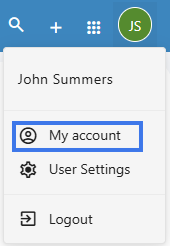
- Click on the **User** icon from the top right to activate the menu. Then click on **My account**
[](https://wikidev.emailarray.com/uploads/images/gallery/2026-06/NEoimage.png)
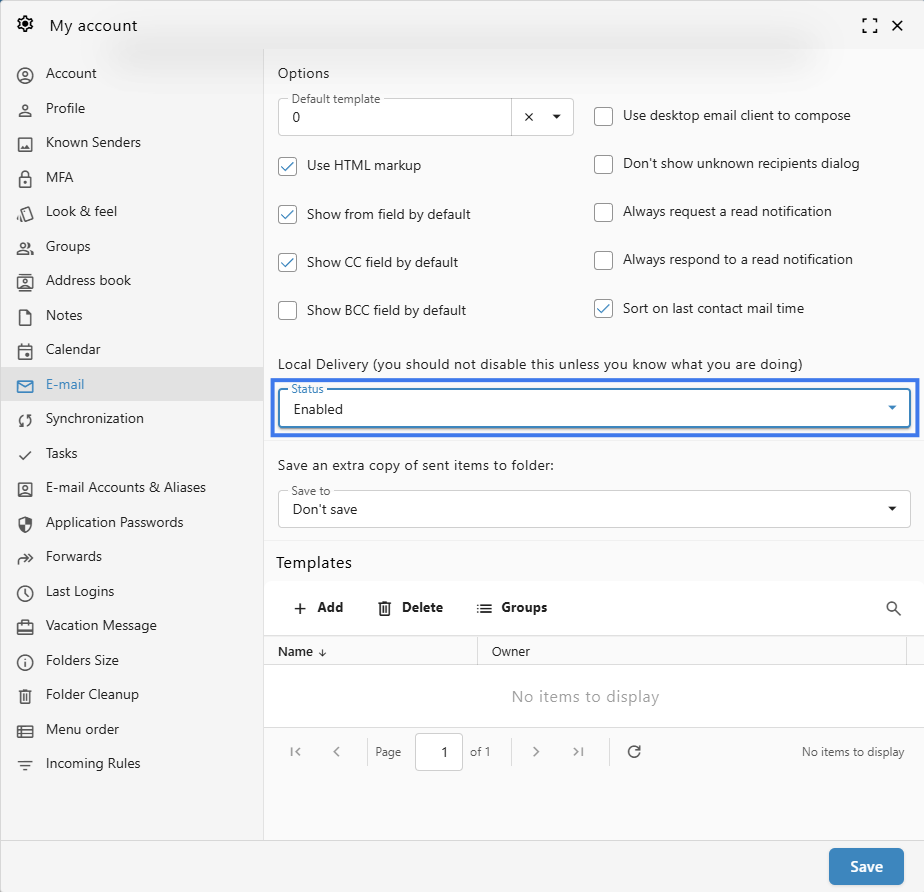
- In the **E-mail** tab, find the Local Delivery section.
[](https://wikidev.emailarray.com/uploads/images/gallery/2026-06/hyjimage.png)
- Change the status to **Disabled**
- Click on the **Save** button
### Option 2: from the User Panel
- Visit the [User Control Panel (https://cp.emailarray.com)](https://cp.emailarray.com/)
- Log in using your full e-mail address ( user@domain.com ) and current password.
- Click on the **Local Delivery** icon
- Change the Status to **Disabled**
- Click on the **Update** button